Categories Salesforce

Build Lightning Web Components

Set Up Visual Studio Code

You already know that Lightning Web Components is a new programming model introduced by Salesforce for building Lightning components. In this article, we’ll discuss what tools you need to build Lightning web components and how to build one.

To create and develop Lightning Web Components and use their powerful features and performance benefits, you need to set up Salesforce DX. You also use Visual Studio Code, which is the recommended Salesforce development environment. You write a simple Lightning web component and add it to a page in Lightning Experience. Below are the steps to create a Lightning Web Component with conditional rendering.

Steps to build Lightning web components

  1. Setup Visual Studio Code
  2. Create a Project & connect to Salesforce org
  3. Create a Lightning web component
  4. Deploy & add to a Lightning page

1. Set Up Visual Studio Code

Visual Studio code editor has easy-to-install extensions for syntax highlighting, code completion, and more. First, install Salesforce extensions for Visual Studio Code. Search for Salesforce Extension Pack and click Install.
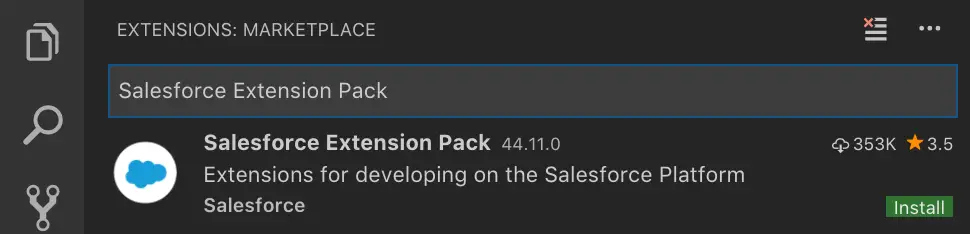
Search for Lightning Web Components and click Install. Re-launch Visual Studio Code to complete the installation.

Make sure the editor is ready by typing sfdx, you should see the commands already.

2. Create a Project & connect to Salesforce org

  1. In Visual Studio code, press Command + Shift + P on a Mac or Ctrl + Shift + P on Windows.
  2. Type SFDX.
  3. Select SFDX: Create Project
  4. Enter a Project Name & click create.
  5. Select SFDX: Authorize an Org. Login & Allow

Success message shows like this.

3. Create a Lightning web component

  1. In Visual Studio code, press Command + Shift + P on a Mac or Ctrl + Shift + P on Windows.
  2. Type SFDX.
  3. Select SFDX: Create Lightning Web Component.
  4. Press Enter to accept the default force-app/main/default/lwc.

Give a name to the component, say Cloud Fountain. This simple component displays the text ‘Hello Cloud Fountain’

This would be your HTML file. In this, we are displaying the text “hello {greeting}”. Note that greeting is a variable here

<template>
<lightning-card title=”HelloWorld” icon-name=”custom:custom14″>
<div>
<p>Hello, {upperCaseName}!</p>
<lightning-input name=”last_name” label=”Last Name” onchange={changeHandler}></lightning-input>
<template if:false={showLastNameOnly}>
<div>
<lightning-input name=”first_name” label=”First Name” onchange={changeHandler}></lightning-input>
</div>
</template>
<lightning-input type=”checkbox” label=”Show Last Name only” onchange={handleCheckBox}></lightning-input>
</div>
</lightning-card>
</template>

view rawhelloWorld.html hosted with ❤ by GitHub

This is the .js file. In this javascript file, we are assigning a value ‘Cloud Fountain’ to the variable called ‘greeting’. @track indicates, it is a variable.

import { LightningElement, track } from ‘lwc’;
export default class HelloWorld extends LightningElement {
// @track greeting = ‘World’;
@track firstName = ”;
@track lastName = ”;
@track showLastNameOnly = false;
changeHandler(event) {
// this.greeting = event.target.value;
const fldValue = event.target.name;
if(fldValue === ‘first_name’)
this.firstName = event.target.value;
else if(fldValue === ‘last_name’)
this.lastName = event.target.value;
}
handleCheckBox(event){
this.showLastNameOnly = event.target.checked;
}
get showLastNameOnly(){
return this.showLastNameOnly;
}
get upperCaseName(){
if(this.showLastNameOnly){
return `${this.lastName}`.toUpperCase();
}
else{
return `${this.firstName} ${this.lastName}`.toUpperCase();
}
}
}

view rawhelloWorld.js hosted with ❤ by GitHub

This is the .xml file. In this file, we are setting isExposed to True implies, this component is available to be used in the Lightning pages. Which type of Lightning pages is defined in the targets.

<?xml version=”1.0″ encoding=”UTF-8″?>
<LightningComponentBundle xmlns=”http://soap.sforce.com/2006/04/metadata” fqn=”helloWorld”>
<apiVersion>45.0</apiVersion>
<isExposed>true</isExposed>
<targets>
<target>lightning__AppPage</target>
<target>lightning__RecordPage</target>
<target>lightning__HomePage</target>
</targets>
</LightningComponentBundle>

view rawlcb.xml hosted with ❤ by GitHub

That’s it. Now you can deploy this project to Salesforce

4. Deploy & Add the component to Lightning Page

Just right click the file and select SFDX: Deploy Source to Org

After deployment, the lightning web component will be available in the App Builder as a custom component on the left side menu to use in the page.

Thank you for reading this post. Please feel free to leave feedback.

Categories Salesforce

Lightning Web Components and Aura Components – coexistence

Lightning Web Component. Aura Component

As you know Salesforce introduced Lightning web components in Spring 19 release and with that the existing Lightning components are renamed as Aura components. So, the question lies how does Aura components and Lightning web components coexist in the same space and here we are to discuss the same. One thing is for sure – Aura components and Lightning web components can co-exist and work together in many different ways.

Coexistence

If you’re looking to use Aura components and Lightning web components together in your applications then there are two strategies to consider: Nested and Side-by-side compositions.

Nested Composition

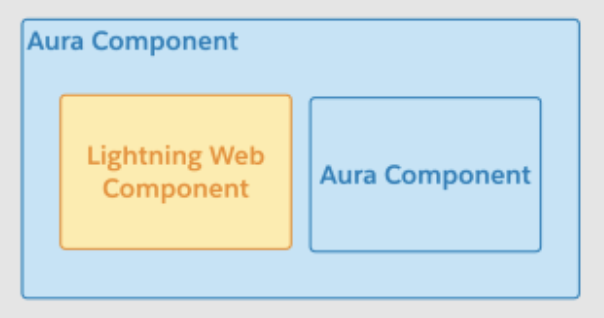
A nested composition is a component within a component, either an Aura component or Lightning web component. This is like a parent-child relationship. The rule is you can have both Aura components and Lighting web components inside a parent Aura component, but Lightning web components can only contain other Lightning web components.

In the above ‘nested composition’ example, the Aura component has two child components: another Aura component and a Lightning web component.

The other parent, Lightning web component, also has two children. Both children are Lightning web components.

Remember – Aura component is the ultimate parent.

Side-by-side Composition

The other type of composition is side-by-side in which Aura component and Lightning web component are not within the same hierarchy but are placed separately in a Lightning App Page as shown below.

Here the parent Aura component and the parent Lightning web component are in Side-by-Side strategy. And within the parent Aura component and the parent Lightning web component, the strategy used is nested composition.

How do they work together?

Now that we have seen the different ways the components can co-exist within a single Lightning App Page, let’s look at how they talk between themselves in both nested and side-by-side arrangement using the above example.

    1. Aura component: The parent aura component can interact directly with child component attributes whether those are standard Aura events or custom Aura event bundles.
    2. Lightning web component: The parent Lightning web component can send and receive information through JavaScript CutomObject objects, as well as interacting with child component methods and properties exposed through public APIs.

Both Aura and Lightning web components can send and receive data through the Lightning Data Service (LDS) and the User Interface API.

Limitation: A mechanism for communication between Aura components and Lightning web components that aren’t in the same component hierarchy isn’t provided by the platform yet! But this will be soon available in Lightning Event Service as highlighted in the images above.

Categories Salesforce

Lightning Web Components: Show Child Records for a Parent

Code samples to quickly start playing with Lightning Web Components:

getContactList.html

<template>
<lightning-card title=”Related Contacts” icon-name=”custom:custom63″>
<div>
<template if:true={contacts.data}>
<template for:each={contacts.data} for:item=”contact”>
<p key={contact.Id}>{contact.name}</p>
</template>
<template iterator:it={contacts.data}>
<li style=”list-style-type: none;” key={it.value.Id}>
<article>
<h3 title=”Anypoint Connectors”><a
href=”javascript:void(0);”>{it.value.Name}</a></h3>
<div>
<ul>
<li>Title: {it.value.Title}</li>
</ul>
<ul>
<li>Phone: {it.value.Phone}</li>
</ul>
<ul>
<li>Email: {it.value.Email}</li>
</ul>
</div>
</article>
</li>
</template>
</template>
<template if:true={contacts.error}>
<p>{contacts.error}</p>
</template>
</div>
</lightning-card>
</template>

view rawgetContactList.html hosted with ❤ by GitHub

getContactList.js

/*eslint no-console: [“error”, { allow: [“warn”, “error”] }] */
import { LightningElement, track, wire, api } from ‘lwc’;
import findContacts from ‘@salesforce/apex/ContactController.getContacts’;
/** The delay used when debouncing event handlers before invoking Apex. */
const DELAY = 300;
export default class ApexWireMethodWithParams extends LightningElement {
@track searchKey = ”;
@api recordId;
@wire(findContacts, { searchKey: ‘$searchKey’ })
contacts;
//connectedCallback function is similar to init method in Lightning Components.
connectedCallback(){
this.searchKey = this.recordId;
}
}

view rawgetContactList.js hosted with ❤ by GitHub

*connectedCallBack(): Check out this function. This is a replacement of “init” event in Aura component.

Apex Controller

public class ContactController {
public List<Contact> contactList {get;set;}
public ContactController(){
this.contactList = new List<Contact>();
}
@AuraEnabled(cacheable=true)
public static list<Contact> getContacts(string searchKey){
List<Contact> lst = new List<Contact>([SELECT Id, Name, Title, Phone, Email FROM Contact WHERE Accountid = :searchKey ]);
return lst;
}
}

view rawContactController.java hosted with ❤ by GitHubCode samples to quickly start playing with Lightning Web Components:

getContactList.html

<template>
<lightning-card title=”Related Contacts” icon-name=”custom:custom63″>
<div>
<template if:true={contacts.data}>
<template for:each={contacts.data} for:item=”contact”>
<p key={contact.Id}>{contact.name}</p>
</template>
<template iterator:it={contacts.data}>
<li style=”list-style-type: none;” key={it.value.Id}>
<article>
<h3 title=”Anypoint Connectors”><a
href=”javascript:void(0);”>{it.value.Name}</a></h3>
<div>
<ul>
<li>Title: {it.value.Title}</li>
</ul>
<ul>
<li>Phone: {it.value.Phone}</li>
</ul>
<ul>
<li>Email: {it.value.Email}</li>
</ul>
</div>
</article>
</li>
</template>
</template>
<template if:true={contacts.error}>
<p>{contacts.error}</p>
</template>
</div>
</lightning-card>
</template>

view rawgetContactList.html hosted with ❤ by GitHub

getContactList.js

/*eslint no-console: [“error”, { allow: [“warn”, “error”] }] */
import { LightningElement, track, wire, api } from ‘lwc’;
import findContacts from ‘@salesforce/apex/ContactController.getContacts’;
/** The delay used when debouncing event handlers before invoking Apex. */
const DELAY = 300;
export default class ApexWireMethodWithParams extends LightningElement {
@track searchKey = ”;
@api recordId;
@wire(findContacts, { searchKey: ‘$searchKey’ })
contacts;
//connectedCallback function is similar to init method in Lightning Components.
connectedCallback(){
this.searchKey = this.recordId;
}
}

view rawgetContactList.js hosted with ❤ by GitHub

*connectedCallBack(): Check out this function. This is a replacement of “init” event in Aura component.

Apex Controller

public class ContactController {
public List<Contact> contactList {get;set;}
public ContactController(){
this.contactList = new List<Contact>();
}
@AuraEnabled(cacheable=true)
public static list<Contact> getContacts(string searchKey){
List<Contact> lst = new List<Contact>([SELECT Id, Name, Title, Phone, Email FROM Contact WHERE Accountid = :searchKey ]);
return lst;
}
}

view rawContactController.java hosted with ❤ by GitHub

Categories Salesforce

Salesforce: Protecting PHI/PII data in Healthcare

Data security is the most important and most difficult aspect when it comes to Healthcare organizations, especially when ensuring the systems remain HIPAA complaint and maintain PHI/PII information safe. This effort is no less easy when you throw SaaS application in to mix. We will try here to address some common pitfalls and easy solutions to ensure that the clients do not falter on these compliance matters when it comes to Salesforce.

Let’s get some terms cleared out before we proceed with our approach:

Salesforce’s default HIPAA compliance features

  • Salesforce is a Business Associate under HIPAA, which requires them to apply safeguards and requirements that are outlined by HIPAA security Rule. This means that the underlying mechanism applied by Salesforce in their offering is HIPAA compliant.
  • Salesforce has defined TLS 1.1 as the minimum standard security protocol and by default requires HTTPS to access standard orgs.

Salesforce’s Customizable Features

Apart from these default features, Salesforce also provides various customizable features to allow customers to apply tighter security controls:

  • Customize user session security: Logout idle users
  • Disable caching usernames: Enforce users to enter username every time they login
  • Prevent PHI/PII information in sandboxes through refresh and cloning: We will touch this topic in detail below.

Salesforce Shield Platform Encryption

Salesforce provides add-on security features like Shield Platform Encryption:

CloudFountain’s custom approach to security. When we work with Healthcare clients, apart from applying the above practices and features, we apply additional solutions to ensure that there is no leakage when it comes to full sandbox refresh or cloning sandboxes.

Introducing SandboxPostCopy Interface

With Spring ’16 release, Salesforce introduced SandboxPostCopy interface. We have tried to leverage this interface to provide additional security when it comes to sandbox refresh and cloning.

In the below snippet, we have defined class CreateDummyEmails which implements the SandboxPostCopy interface:

global class CreateDummyEmails implements SandboxPostCopy {
init();
}

view rawCreateDummyEmails.cls hosted with ❤ by GitHub


The init function calls two functions:

  • findEmailFields: Finds all the email fields in all the SObjects
  • cleanEmailFields: replaces the emails fields with PHI compliant email addresses
global static void init() {
// Map of sObject and list of email fields
Map < String, List < String >> soEmailFieldMap = findAllEmailFields();
// create dummy emails on Email fields found in the sObjects
cleanEmailFields(soEmailFieldMap);
}

view rawinit.CreateDummyEmails.cls hosted with ❤ by GitHub


public static Map < String, List < String >> findAllEmaiLFields() {
Map < String, List < String >> mSObjEmailFields = new Map < String, List < String >> ();
// Iterate through all SObjects
for (SObjectType sObjType: Schema.getGlobalDescribe().values()) {
DescribeSObjectResult sObjDescribe = sObjType.getDescribe();
// Avoid objects that cannot be queried or updated.
if (!sObjDescribe.isQueryable() || !sObjDescribe.isUpdateable()) continue;
String sObjName = sObjDescribe.getName();
// Iterate through all fields
for (SObjectField sObjField: sObjDescribe.fields.getMap().values()) {
DescribeFieldResult sObjFld = sObjField.getDescribe();
// Consider only Email fields
if (sObjFld.getType() != Schema.DisplayType.EMAIL) continue;
if (!sObjFld.isFilterable()) continue;
// Add all Email fields in the map.
if (mSObjEmailFields.containsKey(sObjName)) {
mSObjEmailFields.get(sObjName).add(sObjFld.getName());
} else {
mSObjEmailFields.put(sObjName, new List < String > {
sObjFld.getName()
});
}
}
}
return mSObjEmailFields;
}

view rawfindAllEmaiLFields.CreateDummyEmails.cls hosted with ❤ by GitHub


public static void cleanEmailFields(Map < String, List < String >> mSobjField) {
// Iterate through SObject->Email Fields
for (String sObjName: mSobjField.keySet()) {
// Build a list of all fields that need to be queried
List < String > lstEmailFields = mSobjField.get(sObjName);
// Generate a SOQL query to get records with non null emails
String soql = createSOQL(sObjName, lstEmailFields);
List < SObject > sObjRecords = new List < SObject > ();
// Iterate through SObject records
for (SObject sObjRecord: Database.query(soql)) {
// Iterate through email fields found on SObject and replace with dummy values
for (String strField: lstEmailFields) {
String strEmail = (String) sObjRecord.get(strField);
if (String.isEmpty(strEmail)) continue;
sObjRecord.put(strField, strEmail.replaceAll(‘\W’, ‘_’) + ‘@invalid.invalid.co’);
}
sObjRecords.add(sObjRecord);
}
update sObjRecords;
}
}

view rawcleanEmailFields.CreateDummyEmails.cls hosted with ❤ by GitHub

This is just a glimpse into a more sophisticated solution. Using custom metadata, you can use the same function to create dummy values on other fields e.g. patient name, address, phone numbers etc.

We would love to hear your feedback.

Categories Software Development

What is CPQ?

What is CPQ ?

What is CPQ? It is a software tool that helps companies generate quotes more quickly and efficiently for the products and/or services they offer.

In today’s world, we like to have things our way and that too which suits our need. We tend to have as much customization as we can in our lives and in our day to day tasks. Why not have it when buying services? So, in the world of buying/selling products, a company should come up with ways of providing a combination of their offering.

CPQ software helps to manage the price of all products and services. It enables the sales team to create quotes with an actual price that includes an additional discount, block price, and total percentage. Advanced pricing rules can be defined to handle volume discount, number of subscription, channel and partner pricing.

CPQ software provides the solution to all the three major steps of any business that is selling a product. With just a few clicks, a sales rep can create quotes, and have a document in a pdf format, send an email that has e-signature. All this can be done with accuracy using steelbrick.

C- Configure Products P-Pricing and Discount Q-Quote
  • The process of identifying and combining the product and services based on customer needs.
  • CPQ software enables the sales team to align customer requirements following business rules and constraints.
  • When buying a product, a customer would look for and be attracted to deals wherein they get more discount or bundle price.
  • It is very difficult to maintain different pricing, bundle price and discounts without a software and if a salesperson misquotes the price, it would lead to a disinterested customer and loss of the deal.
  • A company cannot earn unless and until a deal gets closed with a presentable quote.
  • Sales reps put in a lot of time and effort in earning an opportunity from a potential buyer and unless and until he comes up with a correct quote and that too in a presentable and understandable format. The buyers wouldn’t budge, or the deal wouldn’t go through.
  • Quotes are filled with correct data and sent directly to the customer through various channels like pdf, email, DocuSign, print to name few.

CloudFountain inc. provides the solution in CPQ (Steelbrick, Apttus). Please feel free to contact [email protected].

We would love to hear your feedback.