Categories CRM

Benefits of CRM

Benefits of CRM

Introduction

CRM (Customer Relationship Management) is the system that helps you manage all the information about your customers and prospects.

It’s important for most businesses, no matter their size or industry. But what are some of the benefits of using CRM? Read on to find out:

Organizations of All Sizes can Benefit from Using the Right CRM Solution

You may be wondering what the benefits of CRM are, or why it matters to your organization. CRM is an acronym for customer relationship management, which refers to the way that businesses manage their interactions with customers and prospects. It’s important because it helps companies develop stronger relationships with customers by making it easier for them to communicate effectively with each other.

CRMs can be used in a number of ways: some companies use them as part of their sales process; others use them as part of their marketing campaigns; still others use them both ways at once! For example, if you’re selling products online (like we do here at [Company Name]) then having access to information about who has purchased from you before will help guide future communication efforts like email campaigns or ads on social media platforms like Facebook Ads Manager.

Business Development

CRM is a great tool to help you improve your business development and customer interaction. With CRM, you can see who has been contacting you, what they’re interested in, how often they contact you and how much time it takes for them to respond. This data can help identify which customers are more likely to purchase from your brand or recommend it to others. In addition, a CRM system allows salespeople or marketing teams to collaborate on leads so that everyone is working together toward the same goal: closing deals with qualified prospects (or bringing back inactive ones). A Salesforce Integration Company in USA like ours will help you incorporate CRM to work toward improving your relationship with customers.

CRM systems also provide other benefits such as better communication between departments within an organization; improved relationships between companies and their customers; improved sales performance due largely because more accurate information about each customer’s needs allows businesses make better decisions about what products/services should be offered next time around rather than just guessing blindly based on past history alone (which often leads nowhere).

Sales and Marketing Cohesion

The first of the two major benefits of CRM is sales and marketing cohesion. Sales and Marketing need to be working together, not just because it’s good for business (it is), but because they have different goals. Sales want more leads, while Marketing wants more qualified leads. They also have different metrics: salespeople track closed deals and revenue generated from each lead; marketers track how many people downloaded a white paper or watched a video on YouTube.

CRM software can help both sides by bringing all this data together in one place so that everyone understands what both departments are doing at any given time–and why those things matter for reaching company goals overall. With this information at hand, organizations can make better decisions about where they should invest their time or money next year when setting up their marketing campaigns; they’ll know which products will generate the most interest among potential customers; they’ll be able to forecast demand accurately enough so no one gets stuck with excess inventory at year end (which happens often enough anyway).

Lead Management and Tracking

You can use a CRM to manage and track your leads. Lead management is the process of converting leads into customers, opportunities, sales and revenue. As a business owner or marketer you have most likely been tasked with increasing revenue but in order to do this effectively you need to be able to track your leads from start to finish.

Lead management involves:

  • Creating an automated workflow that allows you (or your team) to respond quickly and efficiently when someone fills out an online form or calls in with questions about products/services they’re interested in purchasing
  • Automating tasks so that they happen without any human intervention – saving time while freeing up workers’ brains for higher-value activities

Improved Customer Experience

Customer experience is the most important aspect of CRM, and it’s what can help you turn your customers into raving fans.

Here are some ways that Salesforce can improve customer experience, along with the features that enable these improvements:

  1. Personalization: Salesforce’s CRM tools allow businesses to collect and analyze customer data, which can be used to create personalized experiences. For example, businesses can use Salesforce to segment customers based on their interests, purchase history, or other data points, and then send targeted marketing messages or product recommendations.
  2. Omnichannel Support: Salesforce’s Service Cloud enables businesses to provide support to customers through a variety of channels, including email, phone, chat, social media, and self-service portals. This ensures that customers can get the help they need, in the way that’s most convenient for them.
  3. Automation: Salesforce’s automation tools can help businesses streamline customer interactions and reduce response times. For example, businesses can use Salesforce to automate responses to common customer inquiries or to route customer requests to the appropriate department or agent.
  4. Collaboration: Salesforce’s Chatter feature allows teams to collaborate on customer issues in real-time, which can help resolve issues more quickly and improve the overall customer experience.
  5. Feedback: Salesforce’s CRM tools can also be used to gather feedback from customers, which can help businesses improve their products, services, and overall customer experience.

The Benefits of CRM Include:

  • Improved customer retention rates
  • Higher conversion rates for new leads or sales opportunities

Improved Resource Allocation

With CRM, you can track the resources that have been allocated to each client and project. This means that if a team member needs more time or money to complete the project, then it’s easy for them to request this from their manager.

It also helps with resource allocation by providing information about who can work on what project at any given time. For example, if your company has two developers available but four projects they need to complete within three days’ time (and one of those projects is urgent), then CRM will allow you as a manager/director/executive etc., know who should be working on which project without having an argument with them about who gets what job first!

  • Increased productivity and efficiency
  • Reduced expenses
  • Enhanced customer service, resulting in an improved customer experience

Conclusion

CRM is a powerful tool that can help you better manage your customers, leads, and sales. It’s also useful for tracking resource allocation and improving productivity. By using CRM, you’ll be able to get more done in less time while keeping everyone on the same page at all times. If you want to make the most of Salesforce Integration Services, we’re only a call away!

Categories Big Data Management

15 Marketing Automation Best Practices to Maximize Growth

Marketing Automation Best Practices to Maximize Growth

Introduction

It’s no secret that marketing automation can be a powerful tool for growing your business. But if you’re not using this technology effectively, it won’t do any good.

In fact, it could even make things worse! That’s why we’ve put together this list of 15 best practices for maximizing growth with marketing automation solutions.

1. Create a Clear Marketing Automation Strategy

The first step to maximizing your marketing automation strategy is to define the problem. Before you start on a solution, it’s important to set goals for yourself that are both ambitious and realistic. For example:

  • If your goal is simply “to get more customers,” it might be hard to know when or if you’ve achieved it. You may end up spending months working on strategies that don’t bring in any new leads at all because they weren’t actually solving the right problem!
  • Instead of setting an abstract goal like “more customers” or even something more specific like “increase revenue by 10% this year,” think about what tangible fitness goals you could achieve in three months’ time (or six months). For example:
  • If we want people who sign up for our email list today, but not tomorrow–and then stay engaged with us over time–what would happen if we sent them one email per week? Can we send them two emails per week? Three? Four? Five? Six…and so on until they unsubscribe from our list because they’re getting too many messages from us!

2. Start with the Customer in Mind 

Your customer comes first. The reason you’re in business is to serve them, not to take their money and run.

You need to think about how you can best help them in the ways they want, when they need it and where they are looking for answers or solutions. You need to give them an amazing experience every time they interact with your brand so that when someone asks if anyone knows about X company, everyone says “yes.”

3. Set Clear Goals for your Automation Solutions 

You need to know what you want to achieve and how you will measure success. You can’t just throw a bunch of emails at your customers and hope that something sticks–you need to have clear goals in mind for each campaign, as well as the metrics that define success.

Defining the right goals will help ensure that your marketing automation solution delivers on its promise, which is why it’s so important that you have a process in place for setting them up (and measuring them!). When setting up an automated campaign or sequence of emails, think about:

  • What is my goal for this email? How will I know if it worked?
  • What are my customer’s needs at this point in time? Do they need more information about our product/service? Should I offer free trials or demo videos instead of sending them straightaway into our sales funnel with an expensive purchase decision looming overhead (which might scare away some potential buyers)?

4. Focus on Creating Relevant Content for Every Stage of the Customer Lifecycle

The customer lifecycle is an important concept to understand when it comes to marketing automation. It’s a simple idea: every customer has a different set of needs at any given point in time, so you need to be able to meet those needs with the expected content at every stage of the customer journey.

You can think about this as a funnel, where prospects are at one end and loyal customers are at another (Figure 1). With each interaction, they move closer toward being converted into buyers or repeat purchasers–but only if you provide them with what they want!

5. Don’t Neglect Content Personalization Options

Content personalization is a great way to attract, engage and convert visitors. You can use it to create a more personalized experience for your visitors by showing them content that’s most relevant to them based on their behavior on your site or in email campaigns.

The best part? It’s easy! With the right tools, you can set up customized landing pages for different segments of customers–those who have visited before but haven’t purchased anything yet; those who have purchased from you before but are still active customers; those who have signed up for an email list but haven’t taken any action yet (like signing up for your newsletter).

It’s also important not to neglect content personalization options within emails as well–you should always try sending out emails with personalized subject lines based on recipient data such as name or order history so they know exactly what they’re getting when opening up their inboxes every morning/day/evening/night depending on their schedule.

6. Make Sure to Include social Media in your Marketing Automation Strategy

Social media is a great way to reach new customers, but it can also be a powerful tool for monitoring customer sentiment and identifying new opportunities. Social media allows you to distribute content, drive traffic to landing pages, reach influencers and generate buzz.

The best part? It’s free!

7. Make it Easy to Reach you and your Team 24/7 

  • Be easily accessible for people to reach out to you.
  • Provide multiple ways for customers to reach out, including phone numbers, email addresses and live chat features.
  • Ensure you reply quickly to your customers’ queries, whether it is to thank them or to inform them about your unavailability.

8. Define your Goals

It’s crucial to define your goals and objectives before beginning. This is the first step in any marketing automation strategy. If you don’t know where you want to go, how can anyone else?

You need a clear vision of what success looks like before starting any journey (and yes, this includes yours). You also need to ensure that everyone involved in the project understands what those goals are–and why they’re important.

It’s common for people who are new or unfamiliar with marketing automation tools to start with vague statements like: “I want more leads.” Or: “I want more signups.” But these statements don’t really tell us anything useful; they could mean anything from increasing our email open rates by 10% or increasing revenue by $10 million over three years! That makes it impossible for us as marketers (or anyone else) know how best we should spend our time when setting up campaigns or making adjustments later on down the line.

9. Create a Lead Nurturing Strategy

You should be defining the problem before you start on a solution.

If you’re going to create a lead nurturing strategy, it’s important that you set goals. Don’t worry about what other people’s goals are; instead, be ambitious and stay realistic! For example: “I want my business to generate $100k in revenue by December 31st.”

10. Measure ROI

You want to measure your ROI.

It’s important for you to know how much you’re spending on marketing automation, and what kind of return on investment (ROI) it’s generating for your business. There are two ways of doing so:

  • Cost per lead (CPL). This method calculates the average cost per new lead that comes through the system. You can calculate CPL by dividing total costs by total leads generated by a specific campaign or program over time in order to determine an average cost per lead generated by that particular initiative–for example, $500 divided by 100 leads equals an average cost of $5 each time someone opts-in through an email campaign or webinar registration form. The higher this number is compared with other methods like CPA or CPC means that fewer people have responded positively compared with those who didn’t respond at all (i.,e., no one clicked on any links). However if someone did click but never returned later down the line then their conversion rate would be lower than expected based off previous experience from similar campaigns run elsewhere

11. Pick the Right Tools for your Team

Choosing the right tools is a critical step in marketing automation. You don’t want to choose a tool that’s too complicated or expensive, but you also need to make sure it will integrate seamlessly with other products and services your team uses.

Here are some things to consider when choosing your marketing automation software:

  • Easy-to-use interface: The best software will have an intuitive interface that makes it easy for anyone on your team–even non-technical folks–to use without training or support.
  • Affordability: You don’t want to spend too much money on something that might not work out for you (or worse yet, could become obsolete), so make sure any software solution has reasonable pricing plans based on what features are most important for your business needs today versus tomorrow’s growth opportunities down the road.
  • Compatibility with other tools: If you already use Salesforce CRM or Hubspot CRM, then those platforms would probably be compatible with whatever new marketing automation tooling comes along next year because they all share common data structures like contacts lists and account records.
  • Customization capabilities: Some companies prefer highly customized solutions while others prefer more standardized approaches based around common templates across multiple departments within each organization.

12. Create a Campaign Structure that Works for you and your Customers

You can’t just throw together a bunch of content and expect it to work.

Your campaigns should have a clear structure, with each one building on the last. The goal is to create a campaign that is easy for your customer to understand, helps them make informed decisions about their next steps and ultimately leads them down the conversion funnel.

The following are some best practices for creating effective campaign structures:

  • Have a plan for each campaign – Before you start creating your first automated email sequence or landing page, take some time to think about what you want from each piece of marketing content in relation to its place within your overall strategy. This way when it comes time for execution, there won’t be any surprises or wasted effort on either side (yours or theirs).

Here is when collecting customer data comes to rescue. It helps you analyze customer behavior to make more informed decisions. There are several big data tools available that do the job. You can contact a Big Data Solutions Company to know about the available options.

13. Make Sure your Content is High Quality and Interesting to Visitors

The content you create and publish should be high quality and interesting to visitors. Use visuals to break up text and make it more interesting, but don’t overdo it–you want people who visit your website to read all of your content, not just skim through it! Make sure that all of the information is accurate, relevant and well researched.

Finally, if possible get someone else (a friend or colleague) to look over what you’ve written before publishing anything so that they can point out any mistakes or areas for improvement in terms of style or grammar.

14. Sequence Correctly

Sequence correctly.

  • Make sure everything that goes out into the world is consistent. You want to be sure that every email you send is in line with what you’ve already sent and helps answer the question of why someone should buy from you or subscribe to your email list in the first place. For example, if someone signs up for an ebook on how to grow their business using social media marketing, don’t send them an email about how amazing your new product is four days later! That would be confusing and unhelpful–and possibly even annoying–to them.
  • Don’t send emails out of order: If someone signs up for one thing but then opts into another offer later on (for example, they sign up for a webinar but then later opt-in for some other piece of content), make sure those things aren’t sent out in reverse order either so as not too confuse them about what’s happening next or why they got something else after initially opting-in just one thing (you know what we mean).

15. Communicate with your Team and make sure they Understand the Goals of Each Campaign

The last thing you want is for someone on your team to have different ideas about what a campaign should be, or worse yet, for their goals to get in the way of another person’s. Make sure everyone knows exactly what each campaign is going to do, who it’s going to target and why.

When you’re ready to launch a new campaign or update an existing one, make sure everyone has access to all relevant information so they can follow along with what’s happening as it happens. That way everyone stays informed and understands how important each decision is in terms of reaching those goals as well as how it affects other departments within the company (like sales).

If you follow these best practices, you will see an increase in engagement, conversion and revenue

  • Focus on the customer: You need to know who your customers are so that you can speak to them in a way that resonates with them. This means understanding where they come from, what they want and how they behave online–all of which is critical for crafting personalized marketing messages across channels (e-mail campaigns, social media posts).
  • Set clear goals: You should know exactly what success looks like for each campaign or program before launching it into production because this will help guide decisions about when it’s time to stop investing resources into something that isn’t working well enough yet–or whether we should keep investing more time/money until we reach our desired outcome(s).
  • Make sure everything that goes out into the world is consistent. This means using similar formatting, language and branding across channels. It also means making sure that messaging tracks with customer needs and expectations. For example, if someone reaches out via email asking about pricing, don’t respond by directing them to a landing page about product features or case studies (unless those answers are relevant). Instead, answer their question directly in the next communication. If there’s anything else we can do to answer your question or help with this project, let us know! Otherwise we’ll send over pricing details tomorrow via email ____” Then the next email in the sequence can be something like “Here’s our best price for ___” or “Team member name here didn’t have time to answer your question today but wanted me to let you know that ____”
  • Respond quickly when customers reach out via social media platforms such as Twitter and Facebook Messenger — even if just with an acknowledgement that you’ve seen their message and will get back at them soon!

Conclusion

The best way to get started with marketing automation is by ensuring all your team members understand what it is and why they need it. Ensure everyone knows how to keep their campaigns consistent, so they don’t send mixed messages to customers. To help you do this better, contact us. We offer big data analytics consulting services to help you with marketing automation tremendously. It ensures you correctly use similar formatting, language, and branding across channel sequencing so that each message builds upon the last one; and communicates with each other about goals for every campaign.

Categories Salesforce

Salesforce Integration Best Practices

Salesforce Integration Best Practices

Introduction

Salesforce is a powerful business platform that enables companies to manage all their customer and employee data in one place.

Integrating Salesforce with other systems is a key component to getting the most out of your Salesforce system. To help you get started, here are some integration best practices:

Define your Integration Goals and Objectives

Before you start, you need to define your integration goals and objectives. This means taking a step back and thinking about what you want to get out of the project. Is there an area where your business could be improved? Is there an opportunity for growth that would benefit both parties? Do you want to save money or increase revenue through this partnership?

There are many ways to approach this issue: some may prefer a long-term goal (such as increasing sales), while others might choose something more concrete (like reducing costs). Whatever approach you take, make sure it’s aligned with both parties’ needs and interests–and don’t worry if other people have different ideas about what success looks like! You can always discuss those differences later on; just remember that everyone has different priorities when setting up their own project plans.”

Identify your Salesforce Footprint

Before you can even begin to consider how to integrate Salesforce and Sales Cloud, it’s important to understand the extent of your current footprint. This will help determine which integration methods are best suited for your organization.

What Salesforce modules are you using? To start, take inventory of all the modules in use at your company (for example, Sales Cloud Professional Edition or Enterprise Edition). These modules may include:

  • Sales Cloud – includes activities like lead generation and sales forecasting;
  • Service Cloud – provides tools for service management;
  • Community Cloud – allows users from different departments within an organization share content with one another;
  • Analytics Cloud – provides access to real-time data analysis capabilities through dashboards, reports and scorecards;
  • Chatter social networking tool that facilitates communication between employees across departments

If doing so all by yourself gets to your nerves, it is wise to consider Salesforce Integration Consulting from a renowned Salesforce Integration company.

Select an Integration Partner

Once you’ve decided to integrate Salesforce, the next step is to select an integration partner. There are many different types of partners that can help with this process–from software vendors to consultants.

While it’s tempting to go with the cheapest option, it’s important to remember that cost isn’t everything when it comes time for your company’s long-term success. It’s important that your integration partner be familiar with not only Salesforce but also your industry and business processes so they can provide you with the best value possible.

Maintain a Plan for Scaling up your Onboarding Process

In order to maintain a successful onboarding process, you’ll need to have a plan for scaling up your process as well as one for scaling down. You should also include periodic review of your onboarding process so that it stays fresh and up-to-date with best practices.

To help you define these plans, let’s look at an example: Say you’re building an app that helps salespeople manage leads within Salesforce CRM. You might define three phases in this case–beginning with “onboarding” (the initial setup), followed by “training” (training users on how best to use the application), ending finally with “post-launch support.”

Manage the Performance of your Salesforce Instance(s)

Monitoring the performance of your Salesforce instance(s) is a good way to ensure that your organization is getting the most out of its data. The Salesforce integration best practices below will help you maintain high availability, optimize query performance and reduce downtime:

  • Monitor system health regularly. You should be able to see when there are issues with your Salesforce instance(s) so that they can be addressed before they become major problems.
  • Check for bottlenecks in processing by monitoring Governor Limits, new features, memory usage and SOQL calls for each context. This process should be repeated regularly as new objects are created or moved around within the instance; otherwise there may be significant delays when trying to access those particular records later on down the line!

Integration Best Practices are a Key Component in Getting the Most out of your Salesforce System

Integration best practices are a key component in getting the most out of your Salesforce system. To ensure the system follows the best Salesforce Integration practices, take help from a company offering Salesforce Integration Services. Here are some examples of integration best practices:

  • Platform events, change data capture (CDC) and custom fields can be used to send data to other systems from Salesforce. This helps ensure that all relevant information is available when you need it and allows for more timely reporting and analysis than if you were using manual processes alone.
  • It’s important to understand how much data is being pulled into Salesforce so that you don’t overload yourself with too much information or overwhelm the system with too many API calls–especially if those reports aren’t being used regularly by end users!

Conclusion

Salesforce integration is an essential part of any eCommerce or B2B company’s growth strategy. The best way to ensure that your Salesforce implementation is successful is by following these best practices and keeping them in mind throughout the process. Consider contacting Salesforce Integration Consulting Services based in the USA, such as ours. By doing so, you can ensure that your data will be clean and accurate, which will lead to better business decisions being made by everyone involved in making those decisions.

Categories Salesforce

Pardot vs Marketo vs HubSpot

Pardot vs Marketo vs HubSpot

Introduction

Marketing automation is a set of software applications that will help you automate your marketing process. It enables you to send consistent, personalized messages to your customers and prospects based on their behavior and preferences.

Marketing automation can make the difference between success and failure for your business when it comes to marketing efforts. Without it, it’s difficult to keep up with all the things that need doing in order to be successful. Salesforce CRM Integration Services is a great option for you to build better customer relationships and enhance marketing strategies.

However, like any tool or technology, there are many options available for this type of service – not all of which are created equal! There are some key questions you should ask before choosing one platform over another:

Pardot

Pardot is a marketing automation platform that helps marketers build and nurture relationships with leads, track their progress through the buyer’s journey and close more deals. Pardot provides lead scoring capabilities which allow you to determine the value of each prospect based on their level of engagement with your company. It also allows you to create custom workflows for different types of prospects so that you can personalize messages based on how engaged they are with your brand.

User friendliness

The user interface is very easy to navigate and understand which makes it ideal for beginners looking to get started quickly without having too much trouble learning how everything works together at first glance.

Integration Capabilities

Pardot has over 100+ integrations available including Salesforce CRM integration which allows users access data from both platforms through one single login screen (which makes things easier).

Marketo

Marketo is a marketing automation platform that helps businesses create, manage and optimize digital experiences across all marketing channels. It has a built-in analytics suite that monitors the performance of your digital marketing campaigns, including lead scoring capabilities, user-friendliness and integration capabilities.

Marketo’s email marketing capabilities allow you to send personalized emails based on customer preferences or behavior patterns, which means you can deliver content at just the right time for maximum engagement with your brand.

Hubspot

Hubspot is a marketing automation platform that allows you to manage your entire customer lifecycle from lead generation to conversion. Hubspot has a free plan and paid plans, which are based on the number of contacts in your database (beyond 10,000).

Free Plan

Hubspot CRM

Tracks contact information for all of your leads and customers in one place so you can easily follow up with them at any time. It also includes integrations with other popular services like Salesforce or Google Analytics so that you can track analytics from within the same dashboard as well!

Hubspot CMS

Allows users to create landing pages without having any coding experience; this feature makes it easy for anyone at any level on their team (even non-technical folks) to create amazing content without having any technical knowledge at all!

Paid Plans

Lead Scoring Capabilities

Allows marketers who don’t have much experience creating their own formulas into doing so by providing them with pre-defined rulesets based on different criteria like industry type/size etc., which makes it easier than ever before when trying find new leads within their target market segmentation strategy.”

Takeaway

Pardot is a great marketing automation tool to help you with your lead generation and marketing campaigns. Marketo is another popular option, but Hubspot may be better suited to your needs.

With these three tools, you can easily manage all of your marketing activities from one place–from setting up landing pages and email campaigns to tracking conversions and revenue metrics. But which one should you use?

Conclusion

Marketo is a great platform for marketing automation, but it can be hard to use and expensive. Hubspot offers many of the same features in a simpler interface at a lower price point. Pardot is a good choice if you need more extensive integration with Salesforce or other CRM tools than either option offers. However, if you still need expert advice, contact Cloud Fountain. It offers Custom Application Development Services in USA. Their team will help you with choosing the right platform.

Categories Salesforce

What is Salesforce Integration? How to Integrate it with IT Systems and Applications

What is Salesforce Integration? How to Integrate it with IT Systems and Applications

Salesforce has helped organizations in handling their customer databases for over two decades. This means the technology has been in the domain for a considerable time.

This technology is prominent because it enables users with the right mix of personalization and automation to tailor the services to the client’s requirements. Even if your business demands to extend the functionalities of CRM and merge it with other platforms, Salesforce integration comes into the picture.

As a company offering Salesforce Development Services in USA, we want to highlight all about Salesforce Integration. Whether you’re new to the business world or already are an established business, the article will benefit both. Let’s first start by understanding what Salesforce Integration is.

What is Salesforce Integration? 

Salesforce’s primary purpose is to offer users a unified experience. Salesforce integration is merging the data and functionality of Salesforce with another application. Doing so enables any team with a mix of features from both platforms. Salesforce users face the issue of reconciling data between two platforms and switching them when performing certain activities. Salesforce Integration relieves you from this issue by offering a centralized platform to work on.

Why do Businesses Prefer Salesforces?

Salesforce Integration

This technology is still used by numerous companies across the globe as it helps them be more effective particularly in the areas of CRM (Customer Relationship Management) and remote workforce. While customers and employees are two of the strongest pillars of a successful business, companies flock toward Salesforce.

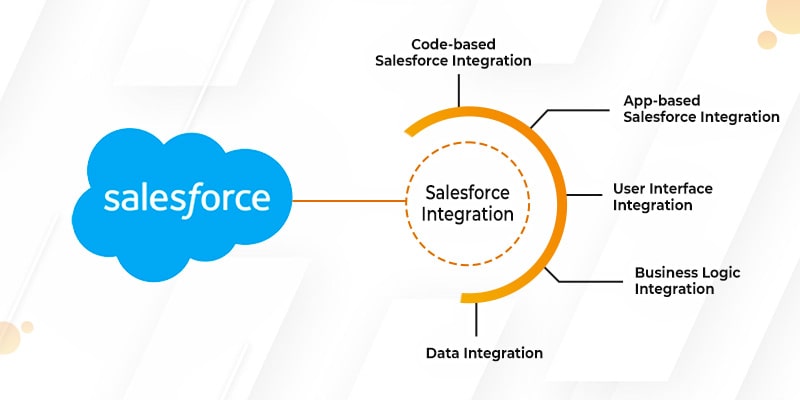
Now that we know what Salesforce Integration is, let’s look at two major approaches to carry out the process of Salesforce integration.

Code-based Salesforce Integration 

One can carry out Salesforce integration even with the help of a programming language instead of using dedicated applications. Apex is among the most prominent programming languages used for code-based salesforce integration. Since the syntax of this language is similar to Java, you will get many developers to code for you.

A few benefits of carrying out code-based Salesforce integration with Apex language are:

  • If offers built-in support for Salesforce lightning platform
  • It is apt for different API versions
  • It is easy to understand and simple to use

If you want to know more about this approach, take Salesforce Integration consulting from a well-known company offering development services like ours. Let us look at another Salesforce Integration approach: App-based.

App-based Salesforce Integration 

As per the name, app-based Salesforce integration is carried out with dedicated applications. These apps enable users to integrate data between two applications and build a unified platform with a few clicks. If you need to integrate your Salesforce CEM with other applications, you will need a robust integration platform that lets seamless transfer of data between two applications. There are some more prominent third-party apps that enable effective Salesforce integration like Jitterbit and Zapier and many others.

While these two are the most used approaches to integrate Salesforce in your system, there are several others. We will have a look at these approaches. Salesforce integration can be done for varying layers within your CRM platforms like user interface, data, and business logic.

User Interface Integration 

Through this integration, users are permitted to enter different applications via a single unified platform. The approach used here is similar to that of Facebook wherein different application vendors are allowed to post content on a single platform. This is one of the most crucial integration types since users in companies need to traverse through different applications from a single platform.

Business Logic Integration 

Business logic integration involves using Apex Web Services for handling inbound and outbound business logic across different applications. The aim here is to accomplish end-to-end business processes. When an application has a business logic integrated, it lets users work efficiently with large amounts of data.

Data Integration

Through data integration, you can use SOAP or REST APIs(types of APIs) to allow a centralized application in your organization. It acts as a key source of a specific business object. This type of integration does not require any coding and it can’t be used to implement any type of custom logic. Data integration, unlike business logic, is fixed. 

Salesforce Integration Checklist 

Salesforce has an integration checklist for all companies/businesses wanting to integrate its services. Before moving ahead with Salesforce integration, ensure you adhere to this checklist for a seamless integration process. You can consult a Salesforce expert if you need to be certain of adhering to this checklist.

Extensive Implementation Planning 

The most significant part of Salesforce Integration is to develop an extensive implementation plan. Just how any other project requires you to create a project timeline to clearly define the objectives of the project, so does Salesforce integration.

Ensure you list down all the technical requirements required for Salesforce integration and the objectives you want to achieve. Also ensure you’re thoroughly aware of the Salesforce integration guidelines and practices while preparing the plan. If you can afford, it’s best to take professional help with Salesforce integration.

Wrapping Up

Hopefully, the blog helped you know all about Salesforce Integration and how to do it. If you’re looking for Salesforce Integration services in USA, feel free to contact us. We offer consulting, development and post-development services for your mobile app or website. All we need are your business and budget requirements!