Categories Salesforce

Salesforce Chatter: What is it, its Benefits, Features and Challenges

Salesforce Chatter: What is it, its Benefits, Features and Challenges

Salesforce Chatter–a cloud-based collaborative tool enables an opportunity for salesforce.com to reach every employee of an organization. Salesforce is the world’s leading cloud-based software provider delivering services to over 15000 businesses globally.
If you’ve ever wondered about Salesforce Chatter, its purpose, or why you should consider using the tool, this blog will satiate your curiosity.
Before we get to the nitty gritty of this tool, it is worth noting that it is World’s first Cloud 2 enterprise social collaboration application unlocking huge potential. Moreover, its unique features make it better than the existing collaborative tools. Let us understand what Salesforce Chatter is.

What is Salesforce Chatter?

Salesforce Chatter is a collaboration application that enables employees to share information, talk to each other and work together. The tool lets you follow people and groups within the organization’s internal network. The working of this feature is similar to the working of Facebook. So, it is a miniature social-networking platform explicitly designed for businesses using Salesforce.

Now that we know what Salesforce Chatter is, below is a breakdown of its features and benefits that make it a one-of-its-kind tool. Let us dive right in.

What are the Key Features of Salesforce Chatter?

As a company offering Salesforce Application development Services, we want to highlight some key features of Salesforce Chatter.

Upload files and manage version control

How many times did you have to rework because of having the wrong version of a document? While these may seem like small bugs, they could have more significant client-facing issues. Chatter offers version control that helps you stop running into such matters. You can keep files like PDFs or word documents up to date with Chatter Files.

Create tasks and polls

Creating actions is an excellent feature for any chat application. It lets users write types of Chatter posts and create & edit records from the Chatter feed. Another helpful part is creating Poll posts. You can use this feature for effective decision-making, such as who to staff on which project, when to start a meeting, etc.

Automate an Out of Office message

You won’t have to wait for answers from employees who aren’t working. With Chatter’s ‘Out of Office’ status, users can write a post and specify their start/end dates for the time they’ve gone.

Reject or Approve records

The tool lets users reject or approve changes to records in several situations, including managing work hours, approving them, and checking updates on other information. To reject or approve records, users should search for the record and find where to reject or approve.

More than a tool for effective communication, it is a comprehensive tool that helps your team collaborate effectively. It allows users to communicate securely at work to share files, establish connections and share status updates.

What are the Benefits of Salesforce Chatter?

After knowing the key features of Salesforce chatter, let’s dig a little deeper into understanding its benefits. While features let you know what the tool offers, benefits state how businesses can use these features to solve their business challenges.

Cleanse emails

You can efficiently declutter emails with chatter tools like group forums, file sharing, and online chats. The tool also allows you to update your projects and share them with other members, after which you can track the updates with the help of the comment section of your post.

Easily share files

Imagine spending time uploading large files and sending them across through emails. This way of sharing files has now taken a back seat when tools like Salesforce Chatter can do the task within a few minutes.

Bid farewell to meetings

Unnecessary meetings take up a lot of time and adversely affect the business’s overall productivity. With Salesforce Chatter, groups can virtually discuss all their ideas and even cancel meetings when not required. The group forum feature lets you share valuable information with other team members, which is a sure-shot way to have more meaningful and constructive discussions.

Promotes organizational unity

The tool is especially suitable for organizations where employees are constantly leaving and coming or where employees are spread across varying regions and countries. Salesforce Chatter comes to the rescue as it helps maintain a healthy work environment with remote employees from across the globe.

Helps save time

The above-mentioned tasks save time along with real purpose. Less uploading and downloading time, proper communication, etc. help you save a lot of time. With the help of this, work efficiency also gets maintained. Features like Version control in Chatter are responsible for saving time for the employees and the organization.

Connected teams

As a company offering Salesforce CRM Integration Services, it comes under our umbrella of responsibilities to also help you integrate plug-ins or activate features like Salesforce chatter. This tool offers real-time updates and alerts for any changes in the projects going under discussion or among teammates. It also enables you to chat with your team members through audio/video calls or texts while viewing the same screen of Salesforce.

Overall, an efficient workplace

These overall benefits aid in an efficient workplace. Salesforce Chatter application helps to make the workplace more efficient for the entire organization. With the help of chatter features, your team can communicate effectively, which leaves your business time to indulge in meaningful activities rather than having long meetings.

Business Challenges of Salesforce Chatter

While we may think Salesforce Chatter is all perks, it’s far from true. There are many challenges with this feature as well. Let’s have a look at a few challenges.

It can be uncomfortable for new users

Chatter is a new thing for users. While some may be comfortable with social networking tools, others may have had no exposure. For those who won’t be comfortable using the tool, it can make them uncomfortable, and it may take considerable time to get accustomed to it. A well-thought communication plan will familiarize users with such social media tools. However, it could be time-consuming.

Communication overload

Yet another common concern for businesses using Salesforce Chatter is information overload. Employees may have a habit of checking their inboxes before ending their workday. Chatter posts as emails would overload their inbox with unread emails. It’s important to note that implementing Chatter can cause an overload in communication and can be overwhelming for some.

No control over what users’ chat about

Many executives get nervous thinking about the fact that they can’t control what people say on Chatter. While they can provide best practices stating what to use and what not to use on Chatter, but at the end, the users control conversations. This could pose a threat to businesses because if the employees use the tool for negative purposes, it could backfire and adversely affect the business’ overall productivity.

You need full Salesforce access

One of the primary challenges of Salesforce Chatter is that your business needs to implement Salesforce. You can’t use Salesforce Chatter without Salesforce since it’s not a standalone feature. This could be an issue for businesses with a tight budget, as implementing Salesforce might not be feasible for all businesses.

Inexperienced support team

Once the implementation is complete, you’ll need ongoing support to ensure that the platform works properly under different circumstances. However, a lack of proper support can severely impact your team’s productivity. So investing in a reliable support team is of utmost importance for a business to run smoothly.

As stated above, Salesforce Chatter has its perks and challenges. However, with a smooth and experienced Salesforce Integration company like ours, implementing this feature makes the process seamless.

In Conclusion

The blog talks about everything you should know about Salesforce Chatter. As a Salesforce Integration Company in USA, we at CloudFountain Inc. offers Application support, Amazon Web Services Consulting, Cloud Consulting, Big data consulting, Custom Application Development. If you intend to know more about our services or specifically about Salesforce chatter feature activation, we’re more than happy to help you solve your queries!
Categories Amazon Web Service

CloudFormation vs. Terraform: Which IaC to Choose for Your Business?

CloudFormation vs. Terraform: Which IaC to Choose for Your Business?

CloudFormation vs. Terraform: Which IaC to Choose for Your Business?

IaC – Infrastructure-as-a-code is mainstream in the world of technology or cloud computing specifically. Cloud enthusiasts to IT businesses are all debating on CloudFormation and Terraform.

Even in the market, the competition between the two is cutthroat. As a matter of fact, ‘the market share of CloudFormation as of September 2022 is 25.34%’, mentions Slintel in a report. Further, it has a massive consumer base of 9804, of which 52.35% comes from the US.

CloudFormation Consumer Base by Geography

Surpassing CloudFormation, ‘Terraform secures a market share of 26.66% for the same duration.’ Its consumer base exceeds that of CloudFormation to 27,676, of which 43.49% comes from the US. We can rightly say that both the tools are well in-demand in the US cloud & infrastructure market.

Terraform Consumer Base by Geography

The main reason behind this demand is that both the IaC technologies help you shape and manage your cloud infrastructure with various tools. You specify how you want your infrastructure to appear, and the tool “applies” that by adding, removing, or changing cloud resources on your behalf.

However, there are significant differences between the two, and we ought to look into each to truly understand their best implementation.

But first, let us define them.

CloudFormation

CloudFormation is an excellent solution by Amazon that allows the DevOps teams to effortlessly automate AWS infrastructure provisioning. With this managed AWS solution, you can design and provide AWS Consulting Services and outside resources for your cloud architecture. Cloudformation uses a JSON file called a template to manage configuration. Such templates give the user the flexibility to construct scalable and reusable infrastructure. YAML is a format that you can also use for Cloudformation templates.

Terraform

Terraform by Hashicorp is a sophisticated open-source application that supports staff members working in IT operations to provide, improve, and maintain infrastructure. The Hashicorp Configuration Language is the domain-specific language used by Terraform. It is entirely JSON compatible and aids DevOps experts in defining infrastructure-as-code.

CloudFormation vs. Terraform

#1 Cloud support

As mentioned earlier, CloudFormation is a product of Amazon exclusively. On the other hand, Terraform is compatible with different cloud platforms. You can use CloudFormation for free if you own an AWS cloud plan, but for any other clouds, you need Terraform.

#2 Human intervention

Software as a service is what CloudFormation offers to you. Running it or maintaining its database’s state files are not issues you need to be concerned with. Your configuration files are sent to the service for use by the CLI tools, which then deliver the results.

When using Terraform, you run it on a machine, and you have to think about the state of file storage, shareability, and authorization to prevent two individuals from trying to alter it simultaneously. It still requires human setup, even if you save it remotely and use locks to make sure only one person has access to it at once.

However, it also offers the Terraform Enterprise service that is pretty identical to CloudFormation, such that you can transfer and run files on their API and have them send you back the results.

#3 Ease of use

It would be best if you acknowledged that Terraform initially is considerably simpler to use. It has an excellent CLI. However, running CloudFormation and its many tools is a little trickier.

If you want to construct or update a stack of resources, you must run a distinct command with the default CloudFormation tool, which is cumbersome. Its many tools eliminate this inconvenience, but they add a new layer you must understand and configure before you can build your initial stack.

#4 The programming language

The key benefit of using CloudFormation for big projects is that there are tools that help you specify your resources in a suitable programming language (Stacker – based on Python, and StackMaster – based on Ruby) and then generate CloudFormation that you use to create your resources.

As a sophisticated configuration file language, Terraform lacks these features, and its shortcomings become clear when attempting to abstract your code to eliminate exact repetition.

#5 Modularity

AWS Lambda functions are called for each action in a CloudFormation template so that you may model any behavior as a resource. CloudFormation also includes built-in programmability. You can create custom resources that can be added or deleted just like regular resources.

Of course, modules exist, but you have to pass every single piece of information into them when you call them. It is often simpler to copy-paste a resource than it is to have to send all the bits of information to it via a module.

#6 Recovery

If a resource in a “stack” in CloudFormation fails to create, update, or remove, the other resources will be restored to their previous states. Terraform requires you to fix your infrastructure when it leaves things broken. When you rerun it, it will continue where you left off. You could be left in a bind as a result of this.

CloudFormation Terraform
Cloud Providers Support Exclusive for AWS Supports 20+ other clouds (Inc. AWS, GCE, Azure)
Configuration Format JSON HCL/JSON
State Management No Yes
Execution Control No Yes
Logical Comparisons Yes Limited
Modularity Yes Yes, but hard
Recovery Restores the previous state You need to fix your infrastructure in case of break downs
Usability Tricker Easy to use CLI

Final verdict

As per our recommendation, you should use CloudFormation if your development is only limited to AWS. But, if you are leveraging multiple clouds, then Terraform is ideal for you.

As always, CloudFountain Inc is here to help if you have more queries and we’ll provide you with complete AWS Serverless Apps Development Services based on your cloud requirements, estimated budget, data volume, and deployed cloud services and infrastructure. Finally, we hope you can identify the right IaC tool for your cloud and make the most out of it.

Categories Salesforce

Microstrategy and Salesforce Integration issues

Database is in Use

MicroStrategy is a platform which provides Business Intelligence service, interactive dashboards, scorecards, highly formatted reports, ad hoc query, thresholds and alerts, and automated report distribution.

Integrating Salesforce.com and other applications with MicroStrategy, will turbocharge your operational reporting with advanced analytics and excellent visualization in MicroStrategy.

In such an environment, MicroStrategy is able to mix data from Sales, product, operations with financial data and give insights which are not possible to derive from just one application. These reports can be displayed inside Salesforce.com using a Canvas application. This enables users to view MicroStrategy reports without navigating out of Salesforce.

Some of the problems encountered in MicroStrategy in such integrations are:

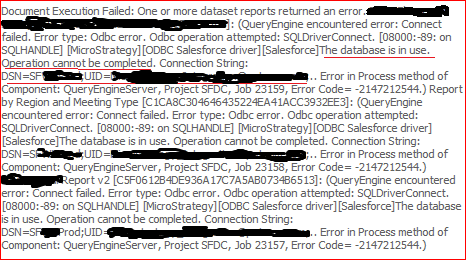
1. Database is in Use.

Solution: Set the CreateDB parameter to 2.

The following are valid values for the ‘Create Database/CreateDB’ setting:

  • If set to 0 (No), the driver will check to see if a database exists and if does not find one the connection will fail.   The driver will not attempt to create the locally embedded database.
  • If set to 1 (ForceNew), the driver will delete the existing database if it exists and will create a new database for each new connection.
  • If set to 2 (NotExist), and the driver detects an existing database it will not attempt to create the database.  If the driver does not find an existing database it will create the database.

2. QueryEngine encountered error: Connect failed.

2017-10-01 20:21:41.534-05:00 [HOST:xyz123-1.abc123.com][PID:xxxx][THR:2837067520][Query Engine][Error][0x80042300] QueryEngine encountered error: Connect failed.

Error type: Odbc error. Odbc operation attempted: SQLDriverConnect. [HY000:-40: on SQLHANDLE] [MicroStrategy][ODBC Salesforce driver][Salesforce]General error: java.util.ServiceConfigurationError: javax.xml.ws.spi.Provider: Provider com.ddtek.sforce.externals.org.apache.cxf.jaxws22.spi.ProviderImpl could not be instantiated: java.lang.NoClassDefFo Connection String: DSN=SF;[email protected];..

Solution: This is due to JDK environment setup issue and requires a manual restart.

3. “column not found” issue

Solution: “REFRESH SCHEMA SFORCE;” before the query of the cube, so this should run every time the cube is executed.

If you need any additional details on Salesforce.com and integration, please feel free to contact [email protected].

Categories CRM

Importance of UX in CRM application

Salesforce.com is the leader in CRM market and most of the implementations are carried using Agile/Scrum methodology. Today I would like to discuss the role of UX and its importance (or the lack of it).

What is UX?

UX stands for User Experience (well you must already know that if you are here). It is is the process of enhancing user satisfaction with a product by improving the usability, accessibility, and pleasure provided in the interaction with the product.[wikipedia] Let’s try to break down this definition:

  • Any Application should be easy to use. Do we need training to use Google or Iphone?
  • Features should be easily accessible.
  • Application should appeal to the users.
  • User Assistance and Help should be easily accessible.

The Absence of UX in CRM Implementation

My usual experience with any large implementation of CRM application (especially Salesforce.com) has been void of any UX consideration. Sure, there are UI design sessions but there are sporadic and there’s no single theme/idea that tie up the whole UI.

My observations have been:

  • Gap in information: The flow of the requirements is Business User -> Business Analyst -> Technical Team. With each handover of requirements, some information is lost and the mismatch in the expectation starts creeping in.
  • Absence of UX: In a 20 week project, I would believe that 4 weeks should be spent on UX and prototyping, however in reality it is not so.
  • Complex UI: The end result is a customized solution with complex and hard to navigate UI.
  • Unnecessary Data/Processes: Users end up having data that they don’t need but they believe they want. In one instance a client had data spread in 30 objects and then there was a complaint of Large Data Volume issues!

Proposed Approaches

I have found that the action items listed below are very productive in resolving the issues above:

  • Effective Communication: This lies in the lap of Scrum Master/Project Manager. How to prevent the discussions from veering off from the story being discussed. If you sit back and listen in on any story grooming sessions, sometimes you might feel that a new religion might be devised when in reality all they need is just a text box.
  • Curtailing the roles: This too should be managed by Scrum Master/Project Manager. It’s quite common to experience that Business Analyst meet with users and get some requirement and they translate that into a solution and provide that as a requirement to the development team.
  • Providing the “Business” need: This is the responsibility of Business Analysts. When the business analysts become experienced with any system, they implicitly start providing solutions as business requirements. Hence this practice must be curtailed by business analyst through self-discipline and solutions architect by asking questions which reveal underlying real business requirements.
  • Adhering solution to Best Practices and requirements negotiation: This is an extremely important responsibility and it lies with the Solution/Technical Architect. It requires courage and guts, to prevent the requirements from being groomed which are incompatible with the system and finesse to negotiate with the users.
  • Defining Nomenclature: This is a collective responsibility of all the parties involved in the project. This requires self-discipline to use the same terms across the users/teams. It is quite common to see different set of people in the same project use different terms to describe the same thing. e.g. Sales would call Prospects which the development team would refer as Leads. I have experienced numerous times that this has resulted in requirements being interpreted incorrectly and resulting in wrong solutions and loss of money and time.

In the end, the successful outcome of CRM implementation depends on the collective responsibilities of all the parties involved, self-discipline, effective communication and it is a collaborative effort.

Categories General

Circuit breaker pattern in Microservice Architecture

Everything fails, accept it!

By now it’s pretty well known that a Microservices architecture has many advantages in terms of low coupling, reusability, business agility and distributed cloud ready applications. But at the same time it makes the architecture brittle, as each user action results in the invocation of multiple services. It replaces in-memory calls of monolithic architecture with remote calls across the network, which works well when all services are up and running. But when one or more services are unavailable or exhibiting high latency, it results in a cascading failure across the enterprise. And the retry logic in service clients worsens the situation for the service exhibiting high latency and brings it down completely.

The Circuit breaker pattern helps to prevent such a catastrophic cascading failure across multiple systems.The circuit breaker pattern allows you to build a fault tolerant and resilient system that can survive gracefully when key services are either unavailable or have high latency.

Everything fails, accept it!

The circuit breaker concept is straightforward. The execution of a function is wrapped or associated with a monitor of some kind, which tracks failures. When the number of failures exceeds a predetermined threshold, the breaker is tripped and any further call attempts return an error without executing the wrapped function. After a timeout period, the circuit is put into a half open state to test if the underlying problem still exists. If a single call fails in this half open state, the breaker is once again tripped. However if it succeeds we then reset the circuit breaker back to the normal state of a closed circuit.

As you can see, the circuit breaker has 3 distinct states – Closed, Open, and Half-Open.

When the circuit breaker is in the CLOSED state, all calls go through to the Supplier Microservice, which  responds without any latency.

If the Supplier Microservice is experiencing slowness, the circuit breaker receives timeouts for its requests to the it. Once number of timeouts reaches the predetermined threshold, it trips the circuit breaker to the OPEN state. In theOPEN state, all calls are returned with an error by the circuit breaker, without making calls to the Supplier Microservice. This behavior helps the Supplier Microservice recover by reducing its load.

In order for the circuit breaker to know if the Supplier Microservice has recovered, it needs a  monitoring and feedback mechanism. It uses this mechanism to make a trial call to the supplier microservice periodically to check if it has recovered. This is called the HALF-OPEN state. If the call to the supplier microservice times out, the circuit breaker remains in the OPEN state. If the call returns success, then the circuit will be switched to CLOSED state.

Example Circuit Breaker using Spring boot:

If you are using Spring Boot, you can use the circuit breaker implementation from Netflix Hystrix fault tolerance library.

@EnableCircuitBreaker
@RestController
@SpringBootApplication
public class CampaignApplication {
@Autowired
private TrackingService trackingService;
@Bean
public RestTemplate rest(RestTemplateBuilder builder) {
return builder.build();
}
@RequestMapping(“/to-track”)
public String toTrack() {
return trackingService.getStats();
}
public static void main(String[] args) {
SpringApplication.run(ReadingApplication.class, args);
}
}

view rawgistfile1.txt hosted with ❤ by GitHub

“EnableCircuitBreaker” annotation tells Spring Cloud that the Campaign application uses circuit breakers that will enable their monitoring, opening, and closing as per availability of tracking service.

Advantages:

The circuit breaker is valuable for monitoring; any state change in the circuit breaker should be monitored, logged and recovered to ensure availability of services.

Testing of various states of the circuit helps you to add logic for a fault tolerant system. For example, if the product catalog service is not available (the circuit is open), then the UI can fetch the product list from the cache.

The circuit breaker pattern handles downtime and slowness of key services gracefully and help those services recover by reducing load.

Future Reading:

https://martinfowler.com/bliki/CircuitBreaker.html

https://spring.io/guides/gs/circuit-breaker/